A lighter inbox.
Connect Gmail to browse mail by category, preview messages and move the ones you select to Trash. Review unsubscribe options in one place.
Google sign-in is optionalYOUR IPHONE, WITH ROOM TO BREATHE
The moments are worth keeping.
The clutter? A little less so.
Sort your photos, lighten your videos and tidy up your inbox with Cleaner AI. You choose what stays.
Explore the featuresComing soon to the App Store
 A little escape.
 The ones worth keeping. Keep
 The everyday favorites.
LESS SORTING. MORE LIVING.
From your camera roll to your contacts,
a calmer iPhone starts here.
PHOTO LIBRARY
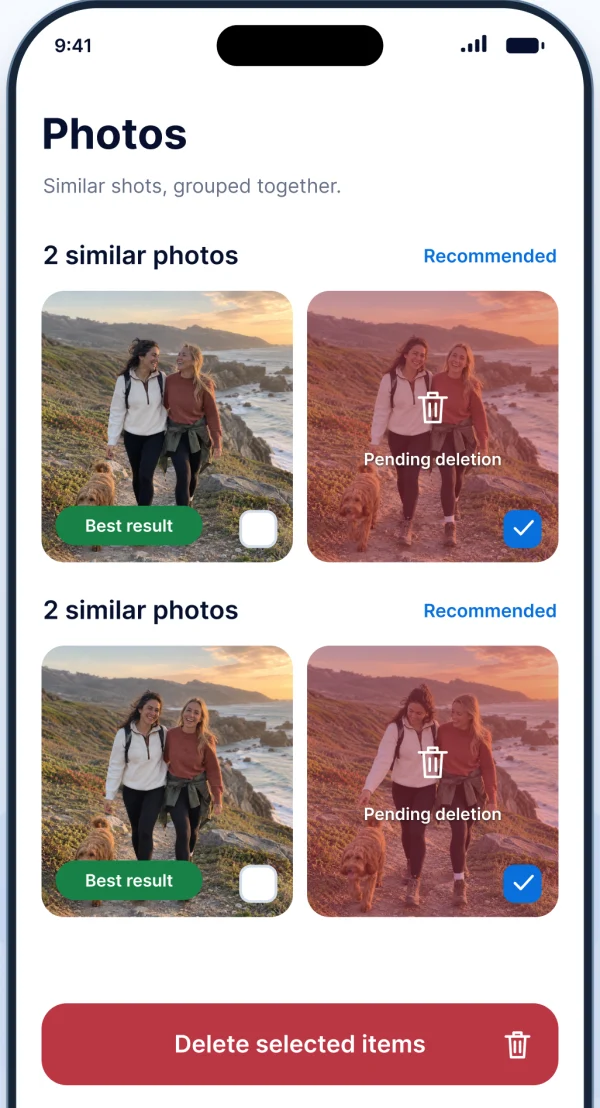
Compare similar shots, spot duplicates and review screenshots or blurry photos. Keep the best moments without going through everything alone.
Suggestions help you decide. Nothing is deleted automatically.
 Save a new copy
VIDEO & LIVE PHOTOS
Choose a video compression level and save a smaller copy. Turn Live Photos into still images when a single frame says it all.
Review the result before deciding what to do with the original. Actual savings depend on your content and settings.
How conversions workBEYOND THE CAMERA ROLL
Connect Gmail to browse mail by category, preview messages and move the ones you select to Trash. Review unsubscribe options in one place.
Google sign-in is optionalFind duplicate contact details and review a merge. Create local backups for the address book you rely on.
A local private album with an optional PIN and Face ID or Touch ID.
Storage widgets and original charging animations for your everyday setup.
YOUR PHONE. YOUR CHOICE.
Your photos and contacts are processed on your device. Cleaner AI doesn’t upload them to our servers or a remote AI service.
Gmail connects directly to Google when you authorize it. You stay in control of permissions and the items you choose to remove.
Read our Privacy PolicyA FEW THINGS TO KNOW
No. Cleanup suggestions are yours to review. Deleting photos or videos requires your action and the applicable iOS confirmation. Review important content and keep a separate backup.
Only if you want to use the Gmail features. Google sign-in is optional and does not create a separate Cleaner AI account. You can sign out or revoke access through your Google Account.
Pro unlocks the space optimization workflow and removes the launch paywall. Other cleanup tools, widgets and charging animations remain available. Subscription pricing and offer eligibility are shown by Apple before purchase.
No. The private album and contact backups are stored locally in the app. Keep separate backups of important content. We cannot remotely recover files stored only on your device.

LET’S MAKE A LITTLE ROOM.
Coming soon to the App Store. Questions? We’re here to help.